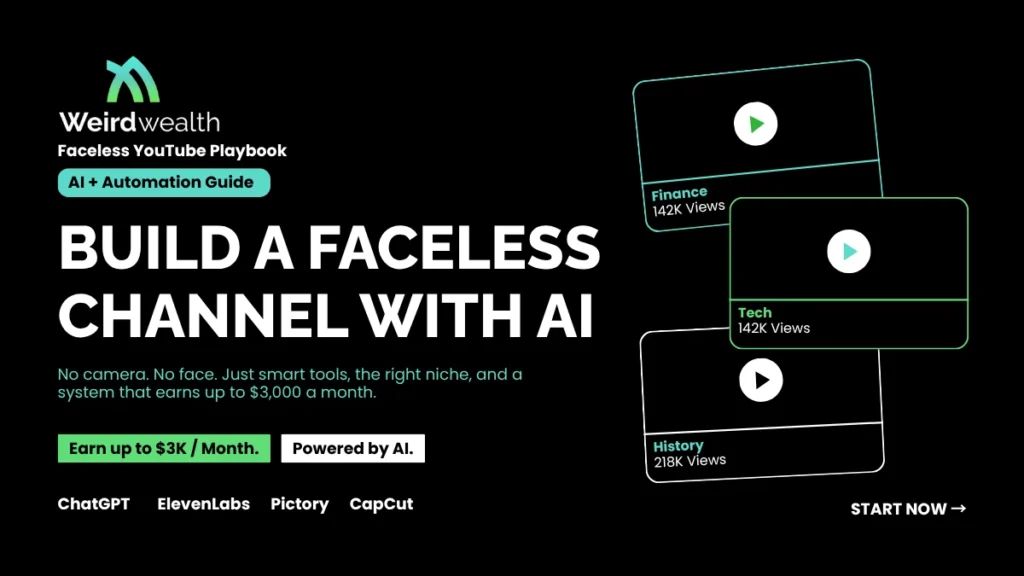
Starting a faceless YouTube channel with AI is one of the smartest side hustles right now. You skip the camera, skip the studio lights, and let smart tools do most of the heavy lifting. Many creators hit $3,000 per month within six to nine months when they pick the right niche and stay consistent.
This guide breaks down the exact steps. You will learn how to choose a profitable niche, write scripts with AI, generate voiceovers, edit faster, and turn views into real income. No fluff, no guessing.
Quick Answer: How to Build a Faceless YouTube Channel With AI
To build a faceless YouTube channel with AI, pick a profitable niche (finance, tech, history, or self-help), use ChatGPT for scripts, ElevenLabs for voiceovers, Pictory or Runway for visuals, and CapCut for editing. Upload three to five videos weekly, optimize titles for SEO, and monetize through AdSense, affiliate links, and digital products. Most channels reach $3,000 monthly within 6 to 9 months.
What Is a Faceless YouTube Channel?
A faceless YouTube channel is a channel where you never show your face on camera. Instead, you use stock footage, AI-generated visuals, screen recordings, animations, or simple text overlays. The voice can be yours or an AI voice. Many top channels in finance, history, and tech run this way. A faceless YouTube channel with AI takes this idea further by automating scripts, visuals, and voice production.
The shift makes sense. People care about value, not who delivers it. A well-told story about ancient Rome or a clear breakdown of credit card rewards pulls views without a single human face.
Why Faceless Channels Work So Well in 2026
Three things make this model strong right now.
- Privacy stays intact. You build a brand without exposing yourself online.
- Costs stay low. Most AI tools offer free tiers or run under $50 a month.
- Time stays flexible. You can batch ten videos in a weekend with the right system.
YouTube also rewards consistent uploads. AI tools cut production time from days to hours, so you can stay on schedule even with a day job.
Best Niches for a Faceless YouTube Channel With AI
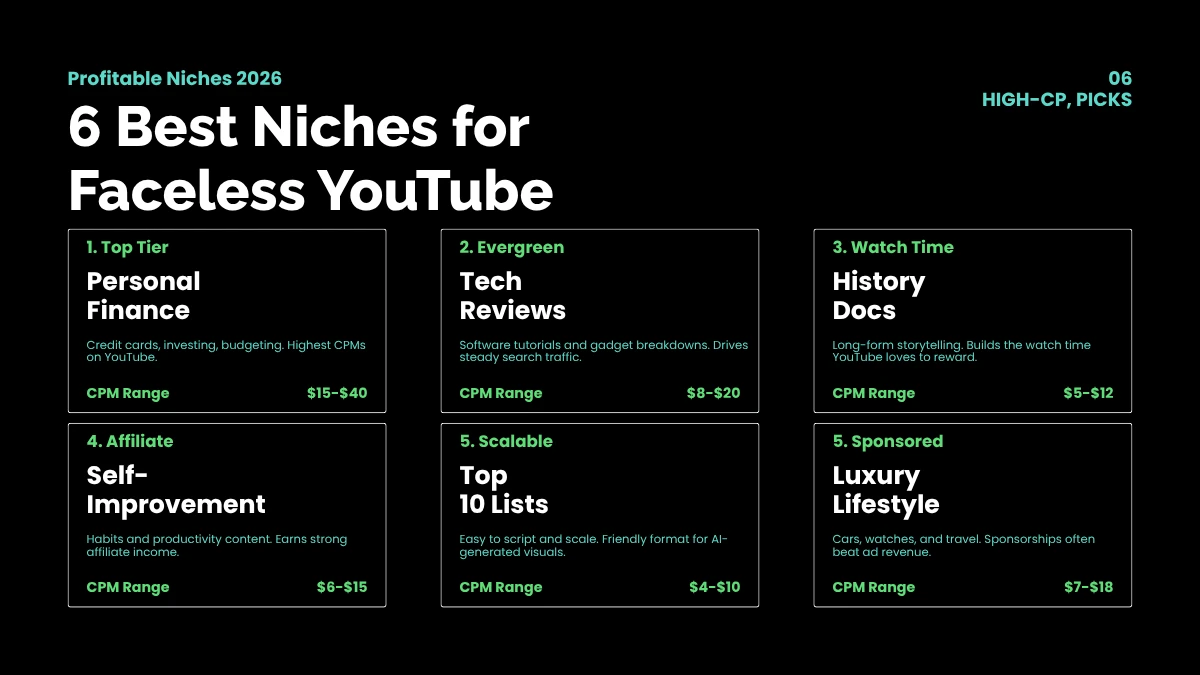
Picking the right niche shapes your earnings. A faceless YouTube channel with AI works best in niches where viewers want information, not personality.
High-Earning Niche Ideas
- Personal Finance and Investing. Credit cards, stocks, and budgeting topics pay strong CPMs, often $15 to $40.
- Tech Reviews and Tutorials. Software walkthroughs and gadget breakdowns get steady search traffic.
- History and Documentaries. Long-form storytelling holds watch time, which boosts ad revenue.
- Health and Self-Improvement. Motivation, habits, and productivity tips bring strong affiliate sales.
- Top 10 Lists and Curiosity. Easy to script, easy to scale, and friendly for AI visuals.
- Luxury and Lifestyle. Cars, watches, and travel content earns through sponsorships.
Pick something you can stand for at least a year. Passion matters less than patience here.
AI Tools You Need to Start
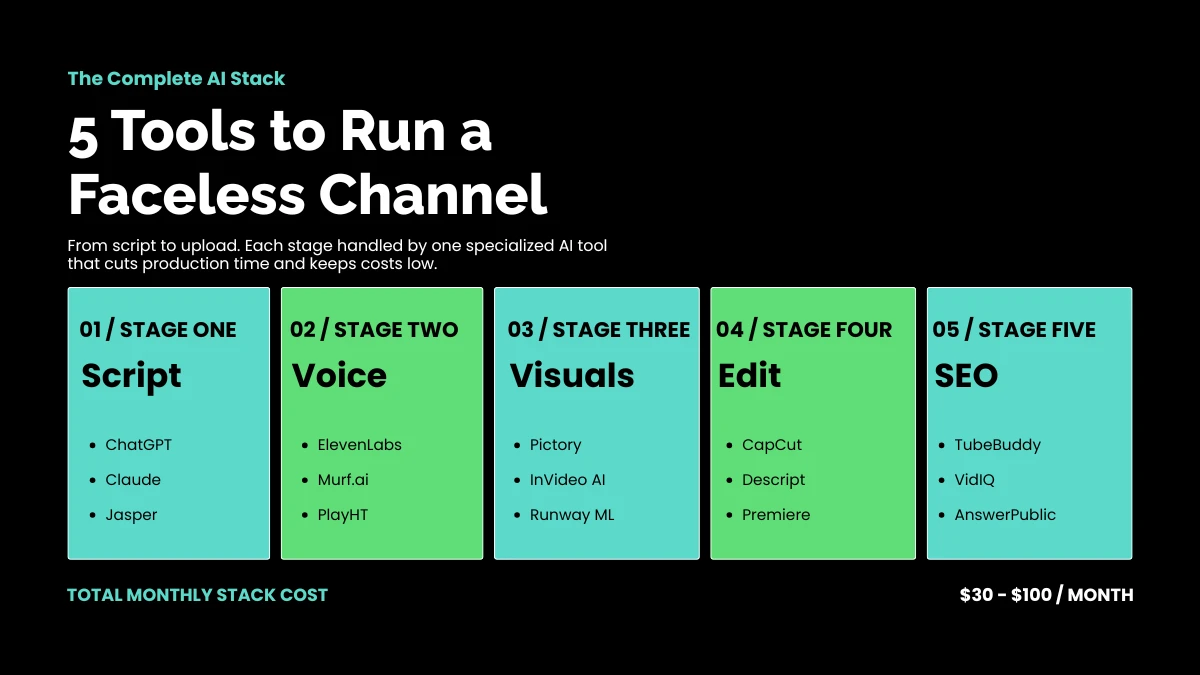
You do not need ten tools. A simple stack covers every part of production.
Script Writing
- ChatGPT or Claude. Generate scripts, hooks, and titles in minutes.
- Jasper or Copy.ai. Useful if you want templates for specific video styles.
Voiceovers
- ElevenLabs. Best for natural, expressive AI voices. Around $22 per month.
- Murf.ai. Good alternative with multiple accents and tones.
- PlayHT. Solid pick for cloned voices and long-form content.
Visuals and Footage
- Pictory and InVideo AI. Turn scripts into full videos with stock footage and captions.
- Runway ML. Create custom AI video clips when stock footage feels too generic.
- Midjourney or DALL-E. Generate custom thumbnails and illustrations.
Editing
- CapCut. Free, fast, and packed with AI features.
- Descript. Edits video by editing text, which speeds up the process.
SEO and Research
- TubeBuddy or VidIQ. Find low-competition keywords and trending topics.
- Answer The Public. Pulls real questions people search around your niche.
Step-by-Step Guide to Build a Faceless YouTube Channel With AI
Building a faceless YouTube channel with AI follows a clear path. Skip a step, and growth stalls. Follow them in order.
Step 1: Validate Your Niche
Open YouTube and search your niche. Look at the top ten channels. Are they posting weekly? Do their videos pull 10,000 views or more? If yes, demand exists. If the top results are all years old or barely active, the niche may be dead.
Step 2: Build the Channel Brand
Pick a name that hints at the niche without boxing you in. Design a clean logo in Canva. Write a channel description with your main keyword in the first sentence. Add a banner that signals what viewers will get.
Step 3: Plan Your First 10 Videos
Search your niche on TubeBuddy. Pick ten topics with strong search volume and weak competition. Map out titles, hooks, and rough outlines before you write a single script. This saves hours later.
Step 4: Write Scripts With AI
Feed your outline into ChatGPT. Ask for a 1,200-word script in a conversational tone. Add a strong hook in the first 15 seconds. Edit the output, because raw AI text often sounds flat. Add personal phrasing, short sentences, and small surprises.
Step 5: Generate the Voiceover
Paste the final script into ElevenLabs. Pick a voice that fits your niche. A calm, neutral tone suits finance. A warmer voice works for history or self-help. Export the audio and listen back at full speed before moving on.
Step 6: Build the Visuals
Drop the audio into Pictory or InVideo. The tool matches stock clips to your script. Swap any clip that feels off. Add zoom effects, captions, and B-roll to keep eyes on the screen.
Step 7: Design a Click-Worthy Thumbnail
Thumbnails make or break click-through rates. Use bold text, contrasting colors, and one clear focal point. Test two versions when YouTube allows it. A 2% jump in CTR can double your views over time.
Step 8: Optimize for SEO
Put your main keyword in the title, first line of the description, and at least two tags. Add timestamps for longer videos. Write a description of 200 words or more. Pin a comment that asks a question to spark engagement.
Step 9: Upload on a Schedule
Three to five uploads per week works best in the first 90 days. The algorithm rewards channels that feed it fresh content. Use YouTube Studio to schedule videos in advance so you stay consistent.
Step 10: Track, Tweak, Repeat
Check your analytics every Monday. Look at click-through rate, average view duration, and traffic sources. Double down on what works. Cut what does not.
How to Make $3K Per Month From a Faceless Channel
Hitting $3,000 a month is realistic with the right mix of income streams. Most creators rely on four channels of revenue.
1. YouTube AdSense
Once you hit 1,000 subscribers and 4,000 watch hours, you join the YouTube Partner Program. CPMs vary by niche. Finance channels often earn $15 to $40 per 1,000 views. Tech sits around $8 to $20. Lifestyle hovers near $3 to $7. With 300,000 monthly views in finance, AdSense alone can clear $4,500.
2. Affiliate Marketing
Drop affiliate links in your descriptions. Amazon, software tools, and finance platforms pay solid commissions. A single VPN affiliate sale can pay $30 to $80. Tech review channels often earn more from affiliates than ads.
3. Sponsorships
Brands pay for shoutouts once you cross 20,000 subscribers. A 60-second sponsor read in a finance video can pay $300 to $1,500. Reach out to brands directly or sign up on platforms like FameBit and PassionFroot.
4. Digital Products
Sell ebooks, templates, or courses tied to your niche. A history channel might sell a curated reading list. A finance channel could offer a budget spreadsheet. Even a $19 product moves well when your audience trusts you.
A Realistic Income Timeline
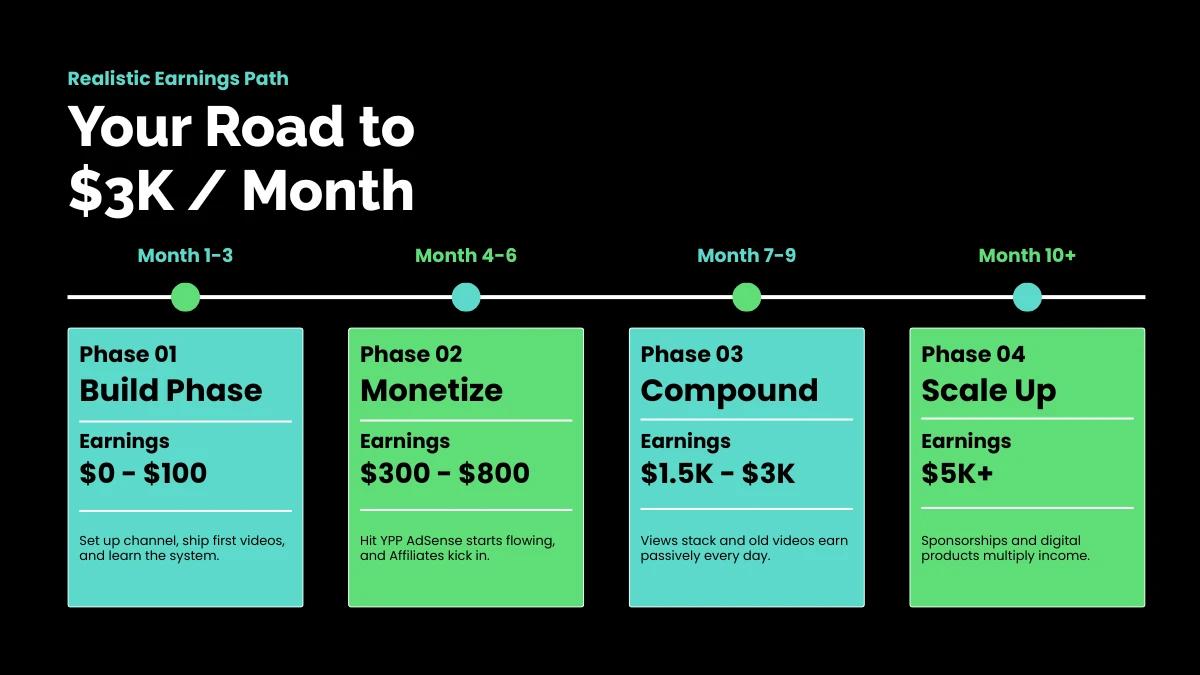
- Months 1 to 3: Channel build phase. Expect $0 to $100 in earnings.
- Months 4 to 6: Monetization kicks in. Income grows to $300 to $800.
- Months 7 to 9: Compounding views push you to $1,500 to $3,000.
Month 10 and beyond: Sponsorships and digital products often push earnings past $5,000.
Common Mistakes to Avoid
Most failed channels share the same problems. Sidestep these and you cut months off your timeline.
- Chasing trends instead of a clear niche. Random topics confuse the algorithm.
- Weak thumbnails. Even great videos flop with bland visuals.
- Robotic voiceovers. Use newer AI voices and add light edits for human feel.
- Ignoring SEO. A great video buried on page five earns nothing.
- Quitting early. Most channels see real growth between months four and seven.
Scaling Beyond $3K Per Month
Once your faceless YouTube channel with AI earns $3,000 a month, the next level needs systems, not more hustle.
- Hire a freelance scriptwriter or editor. Upwork rates start around $15 per script.
- Launch a second channel in a related niche. Reuse your workflow and double your output.
- Build an email list. Drive viewers to a free guide tied to your niche.
- Repurpose content. Turn long videos into Shorts, blog posts, and Pinterest pins.
Many creators scale from $3K to $10K within a year by treating their channel like a small media company.
Final Thoughts
A faceless YouTube channel with AI gives you a real shot at $3,000 a month without showing your face, learning complex editing, or quitting your job. The tools are cheap, the niches are open, and the demand is growing every quarter.
Pick a niche today. Set up your first ten videos this week. Upload your first script next weekend. Most people overthink and never start. The ones who win simply keep showing up, one video at a time.
Frequently Asked Questions
How long does it take to make $3,000 a month with a faceless YouTube channel?
Most creators hit $3,000 between months six and nine. Speed depends on niche, upload schedule, and how well you optimize each video for search.
Do I need to invest money to start a faceless YouTube channel with AI?
You can start free with ChatGPT, CapCut, and Canva. Once you grow, expect to spend $30 to $100 a month on premium tools like ElevenLabs and Pictory.
Will YouTube penalize me for using AI-generated content?
YouTube allows AI content as long as it adds value and you label any synthetic media when required. Channels that just paste raw AI scripts get flagged. Add your voice, edits, and unique angle to stay safe.
Which niche is best for a beginner faceless channel?
Top 10 lists, history, and self-improvement work well for beginners. They need fewer specialist skills, and AI tools can handle most of the production.
How many videos should I upload each week?
Three to five videos per week is the sweet spot in the first 90 days. After that, you can drop to two or three high-quality uploads weekly without losing momentum.