

Budgeting apps for irregular income need to answer a harder question than “How much did I spend?” They need to help you decide how long the money you have can support you. A freelancer can earn well over a year and still struggle during a quiet fortnight. A commission payment might arrive after rent is due. A business owner might have a strong sales month while much of that cash belongs to operating expenses.
The challenge is the gap between income arriving and money leaving. The apps below offer different ways to manage that gap. Some emphasize allocating available money. Others help organize spending, coordinate household finances, or examine future cash flow.
Editorial note: Product information was reviewed in November 2026. These are research-based comparisons, not hands-on testing results. Check current subscriptions, regional availability, and account support before choosing.
Key Takeaways
- Budget around money received; keep expected income separate.
- Prioritize the expenses due before your next reasonably reliable payment.
- Use strong months to prepare for quieter periods and irregular bills.
- Choose an app by its budgeting method, rather than the number of features.
- Forecasts show scenarios based on assumptions; they cannot guarantee payment dates.
- Keep business obligations separate from money available for household spending.
What Should Budgeting Apps for Irregular Income Help You Do?

A conventional monthly budget can look balanced while leaving you short next Tuesday.
Suppose you expect $3,000 this month and have $2,500 of expenses. On paper, you have breathing room. But if most income arrives at the end of the month and rent is due at the beginning, the timing still creates a problem.
For uneven earnings, look for a workflow that helps you:
- See the money currently available.
- Assign it to essential commitments.
- Prepare for expenses that do not arrive every month.
- Understand the effect of a delayed payment.
- Adjust without rebuilding everything.
No app removes uncertainty. A useful one makes your next decision clearer.
Which Apps Are Worth Comparing?
These use cases are editorial judgments based on documented features. They are not a claim that every app has a dedicated irregular-income mode.
| App | Useful capability | Main thing to test |
| YNAB | Allocating available money to priorities | Planning between uneven payments |
| Goodbudget | Envelope budgeting | Separating strong-month money from spending money |
| PocketSmith | Cash-flow forecasting | Moving an expected payment to a later date |
| Quicken Simplifi | Spending plans and projected cash flow | Updating the plan when income changes |
| EveryDollar | Monthly zero-based budgeting | Revising allocations after payments arrive |
| Monarch | Shared budgets and financial visibility | Coordinating variable and fixed household income |
| Lunch Money | Multi-currency tracking | Reconciling overseas payments and fees |
| Actual Budget | Local-first envelope budgeting | Maintaining a reliable setup and backup |
| Wallet by BudgetBakers | Budgets and account organization | Separating categories and transfers accurately |
| Buxfer | Budgeting and statement imports | Turning transaction records into useful limits |
1. YNAB: Plan Around Money Already Received

YNAB is a strong starting point for people who want to make deliberate decisions whenever income arrives. Its budgeting approach centers on assigning available money to priorities. Targets, manual transaction entry, and bank imports where supported help maintain that plan. For a freelancer, the useful question becomes: “What must this payment cover before more money arrives?”
That question can prevent a large payment from feeling like a sudden increase in spending power. Part of it may need to support a quiet week, an upcoming bill, or an expense several months away. The trade-off is attention. You need to review allocations and move money when circumstances change.
Try this: Enter the money available today and allocate it without relying on unpaid invoices. Check how far your essential categories are covered.
2. Goodbudget: Give Strong-Month Income Separate Envelopes
Goodbudget uses digital envelopes to divide money among spending categories. Its free plan has account and envelope limits. Premium expands capacity and offers automatic bank syncing for US banks. The method can be useful when a busy month creates the temptation to spend as though every month will look the same.
You might create envelopes for current essentials, annual expenses, and income gaps. Those category names are your own budgeting structure, rather than a special app feature. When another payment arrives, you can allocate some toward future needs before increasing discretionary spending. Try this: Set up a “quiet month” envelope alongside normal categories. Check whether the free plan provides enough room for a useful, manageable setup.
3. PocketSmith: Explore the Consequences of Late Payments
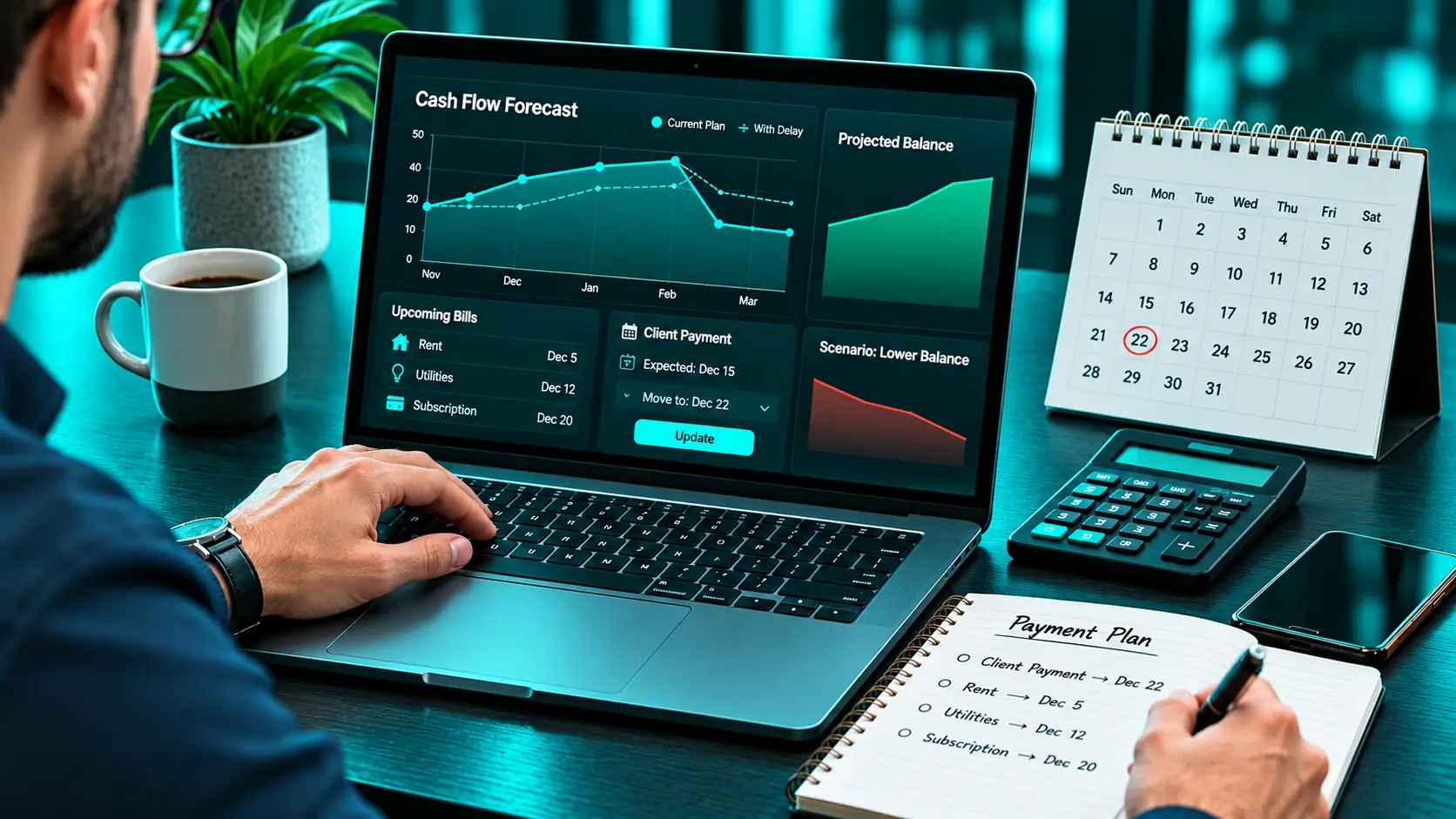
PocketSmith emphasizes budgeting and cash-flow forecasting, including calendar-based planning. That makes it relevant when the biggest problem is timing. You may have enough work booked while still needing to understand whether money will arrive before a bill falls due. A forecast lets you examine the sequence of expected income and expenses. Its value increases when you test less comfortable assumptions alongside your expected outcome.
For example, move a client payment back by two weeks. If the projected balance becomes tight, you have identified something to prepare for. The forecast remains conditional. A number shown on a future date is not money already received. Try this: Compare your expected schedule with a delayed-payment scenario. See whether the difference is easy to understand.
4. Quicken Simplifi: Keep a Spending Plan Open to Revision
Quicken Simplifi offers spending plans, savings tools, reporting, and projected cash flow. It is worth comparing if you want an overview of everyday finances and are willing to update assumptions as income changes. The important habit is distinguishing a likely payment from a confirmed deposit. A plan built around an optimistic estimate may encourage spending before the income becomes available.
Use conservative assumptions and review them when circumstances change. If a client delays payment, adjust before treating the original spending amount as available. Simplifi is a separate product from Quicken Classic, so compare the exact subscription you need. Try this: Reduce an expected payment and review the effect on your plan. Check whether you can make a useful adjustment quickly.
5. EveryDollar: Give Each Payment Specific Jobs

EveryDollar supports monthly zero-based budgeting, manual expense tracking, savings categories, and bill due dates. Paid features include bank connections and additional planning tools. Its approach can suit people who want a clear allocation across expenses, saving, and debt payments. With variable income, the discipline is to revise allocations as money arrives rather than committing every category against hoped-for earnings.
Start with essentials. If income exceeds your conservative plan, decide deliberately where the additional money belongs. You may allocate it to a future bill, an income buffer, or another priority. A stronger month becomes an opportunity to improve the next month. Try this: Build a lean month first. Then add a second payment and check how easily you can update the allocations.
6. Monarch: Coordinate Uneven Income Across a Household
Monarch combines account information, budgeting, goals, transaction categorization, and net-worth tracking. It also supports collaboration with a partner. That is useful when one person receives a predictable salary while another earns from contracts, commissions, or a business. A shared view can help both people understand which bills have reliable coverage and which depend on variable earnings.
However, the household still needs an agreement. Decide how much variable income goes toward shared commitments and when you can increase discretionary spending. Without that agreement, the same deposit can look like savings money to one person and spending money to the other. Try this: Review one lower-income month together and agree on a plan both people can explain.
7. Lunch Money: Make Cross-Border Earnings Easier to Follow

Lunch Money offers multi-currency tracking and displays totals in a selected primary currency. Its documentation describes historical exchange rates for transactions. This is relevant if clients pay in dollars or euros while your household expenses use another currency. An invoice amount, a payment-platform balance, and the final bank deposit can all differ.
Provider fees and exchange rates may affect what becomes available to spend. A consistent reporting view helps you examine those movements. You still need to reconcile the amount actually received. Be especially careful with transfers: moving your own funds between accounts should not create a second apparent income payment.
Try this: Trace one overseas payment from receipt to the final local deposit. Verify the treatment of fees, conversions, and transfers.
8. Actual Budget: Use Envelopes With More Setup Responsibility
Actual Budget is an open-source personal finance tool using a local-first design and envelope budgeting. It may appeal if you want to allocate available money while retaining more control over your setup. For irregular earnings, you can create categories that distinguish immediate obligations from money reserved for later periods.
The benefit comes from that budgeting structure and your upkeep. Before committing, understand backups, syncing, and any hosting or connected services you choose. Open-source software can still involve costs and administrative work. A system you enjoy maintaining may be worthwhile. A setup you repeatedly postpone is unlikely to help.
Try this: Build a small budget and establish a recovery process before importing your complete financial history.
9. Wallet by BudgetBakers: Organize a More Complicated Money Picture
Wallet offers budgets, personal finance tracking, multi-currency support, and paid household-sharing features. It is worth comparing if several accounts, currencies, or household categories make your spending difficult to follow. For someone with uneven income, clear organization can reveal whether money has already been reserved for a particular purpose.
Account structure matters here. A transfer from a payment platform to your bank should not make your earnings appear larger than they are. Verify the exact features available on your device and whether your institution is supported.
Try this: Add a small number of accounts and categories, then reconcile a transfer before expanding the setup.
10. Buxfer: Build Better Decisions From Transaction Records
Buxfer offers budgeting features, including envelope budgeting, and supports bank-statement uploads. That can help if automatic connections are unsuitable but you can reliably import records. Looking back at transactions can reveal the essential spending level you need to support during a quieter month. However, historical spending should inform your plan rather than dictate it without review.
Some expenses were optional. Others were one-off costs. Distinguishing them makes your baseline more useful. Import a small statement first so you can identify duplicates or classification errors.
Try this: Review a lower-income month and separate essential commitments from spending you could realistically adjust.
How Can You Build a Budget That Survives a Quiet Month?
Use a three-layer plan: essentials, predictable irregular expenses, and an income buffer. Essentials cover the commitments that keep your household functioning. Predictable irregular expenses include costs you know will arrive, even if they are not monthly. The income buffer supports the gaps between earnings. Its appropriate size depends on your obligations and how uncertain your income is.
Consider this hypothetical example:
| Allocation from a $2,400 payment | Amount |
| Essential expenses before the next expected payment | $1,400 |
| Provision for known irregular bills | $250 |
| Contribution toward a separate tax reserve | $350 |
| Income buffer | $250 |
| Discretionary spending | $150 |
| Total | $2,400 |
The tax amount is illustrative, not a recommended percentage. Actual obligations depend on your circumstances and jurisdiction. The useful lesson is that receiving $2,400 does not necessarily create $2,400 of household spending money. Give each part a purpose before judging what you can afford.
What Should You Check During an App Trial?
Use real dates and imperfect conditions.
- Enter a payment that arrives later than expected.
- Include a bill that falls before the next deposit.
- Add an annual expense.
- Check how transfers and credit-card payments are recorded.
- Test cash purchases and payment-platform fees.
- Confirm currency and local bank support.
- Review renewal pricing, exports, and cancellation terms.
- Complete a weekly review without rebuilding the budget.
Avoid starting with an elaborate category list. A small system you maintain provides a better foundation for improvement.
Frequently Asked Questions
Which budgeting app is best for freelancers?
It depends on the difficulty you face. Compare envelope tools for allocating available money, forecasting tools for payment timing, and multi-currency tools for overseas earnings.
Should I budget using average monthly income?
An average can help with longer-term planning, but it can conceal shortfalls. Check money currently available and bill dates before committing spending against that average.
How should I record an unpaid invoice?
Keep expected income distinguishable from received income. You can use expected payments in a forecast, but they should not be confused with cash available today.
Can these apps connect to Pakistani banks?
Check the specific app and institution. Currency support and bank connectivity are separate capabilities. Manual entry or statement importing may be more practical where direct connections are unavailable.
What if I have a very strong income month?
Review upcoming commitments, known irregular expenses, and your buffer before increasing spending. Decide how much of the stronger month needs to support future periods.
Make a Good Month Help the Next One
Irregular income makes it easy to swing between feeling comfortable and feeling behind. A clear budget gives you a steadier view of the same money. Choose an app that helps you allocate payments, understand timing, or coordinate household decisions. Then review it whenever meaningful income arrives and before major commitments fall due. The goal is to reach a good month and know exactly how it can make the quieter one easier.